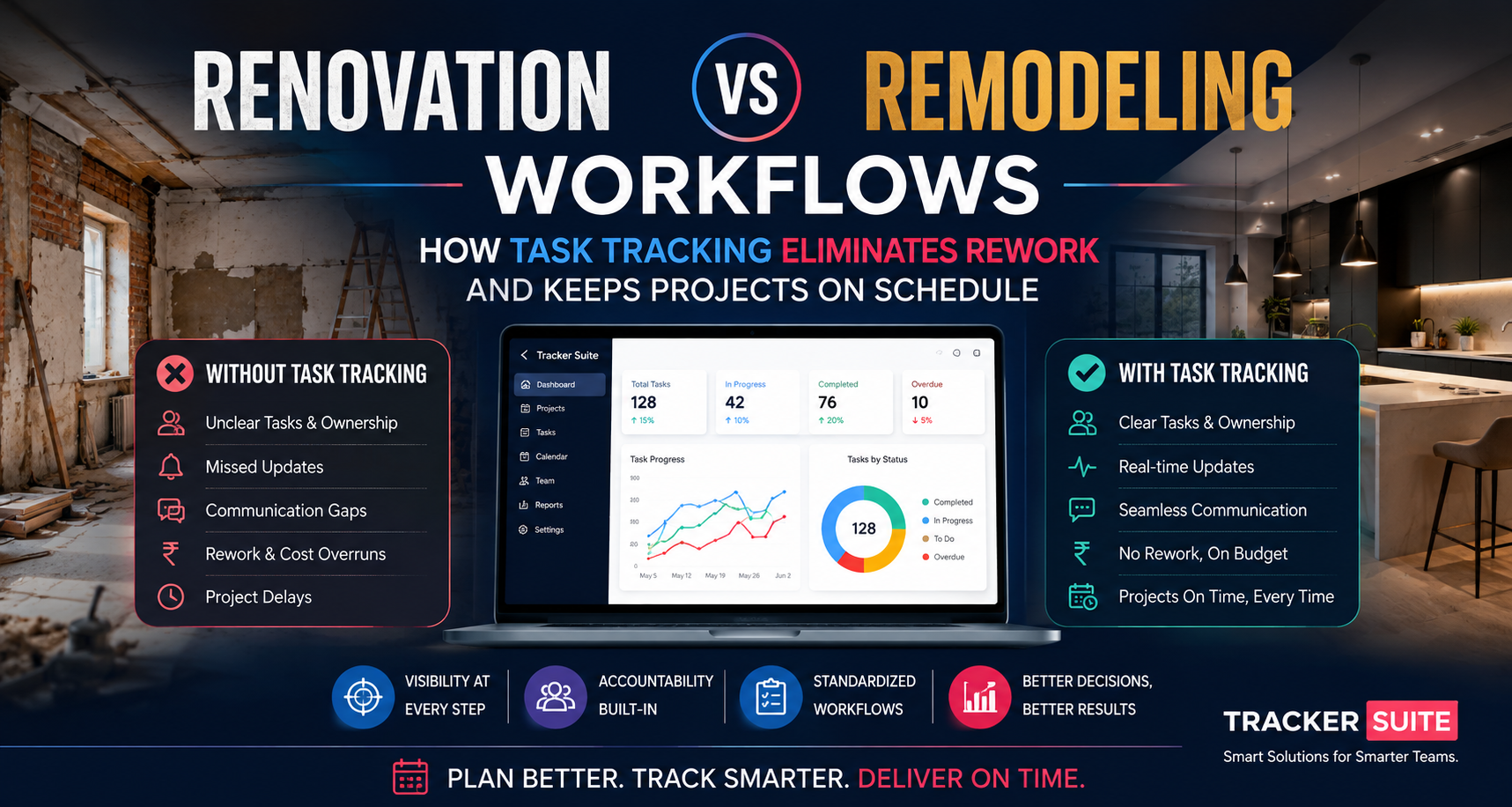
Explore the operational differences between renovation and remodeling workflows, how miscommunication causes $31B+ in construction rework, and how modern task tracking prevents spreadsheet sprawl.
Key Takeaways
- Operational Distinctions: Renovations focus on restoring existing structures to original standards, while remodeling fundamentally alters spatial layouts, mechanical systems, and structural framing.
- The True Cost of Miscommunication: Research from Dusty Robotics and PlanRadar shows that U.S. construction rework accounts for $177 billion annually, with poor communication alone driving over $31 billion in avoidable waste.
- Process Bottlenecks: Managing trades across WhatsApp chats, static spreadsheets, and verbal handoffs inevitably results in scope creep, delayed milestone sign-offs, and scheduling conflicts.
- Connected Operations: Centralizing site workflows with photo verification, mobile check-ins, and automated client updates creates an accountable operational record from demolition to punch list.
- Cross-Discipline Application: While critical for construction managers and civil engineers, structured task management provides identical visibility and control for multidisciplinary operations spanning logistics, enterprise delivery, and professional services.
Industry Context: The High Cost of Construction Misalignment
Construction and residential revitalization projects operate under tighter margins and stricter deadlines than ever. In North America, industry studies show that 98% of projects face schedule disruptions, extending project durations by an average of 37% beyond baseline targets.
While external factors like material shortages and weather disruptions play a role, internal workflow friction remains the single largest preventable cost driver. Research published by Dusty Robotics and PlanRadar reveals that rework costs the U.S. construction sector approximately $177 billion each year, typically representing 5% to 20% of an individual project’s total budget. Crucially, poor communication and data disconnects between field teams, trade contractors, and project managers account for over $31 billion of that annual rework figure.
When subcontractors work off outdated drawing revisions, site leads miss unapproved field changes, or property owners change specifications over informal phone calls, schedules collapse. Understanding the structural and operational differences between renovation and remodeling workflows is the first step toward building an operational system that eliminates miscommunication.
The Operational Differences: Renovation vs. Remodeling Workflows
While frequently used interchangeably, renovation and remodeling describe distinct operational undertakings with different risk profiles, trade sequences, permitting requirements, and data governance needs.
1. Renovation Workflows (Restoration and Repair)
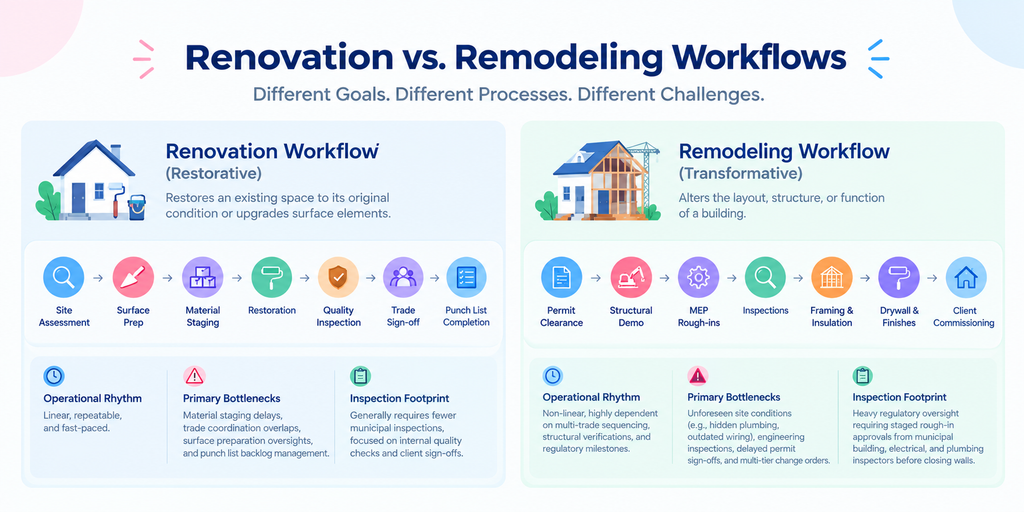
Renovation focuses on restoring an existing space to its original condition or upgrading surface elements without modifying the underlying structural layout. Typical projects include repainting, replacing worn flooring, upgrading fixtures, re-roofing, or refinishing cabinetry.
- Operational Rhythm: Linear, repeatable, and fast-paced.
- Primary Bottlenecks: Material staging delays, trade coordination overlaps, surface preparation oversights, and punch list backlog management.
- Inspection Footprint: Generally requires fewer municipal inspections, keeping coordination focused on internal quality checks and client sign-offs.
2. Remodeling Workflows (Transformation and Reconfiguration)
Remodeling fundamentally alters the layout, structure, or function of a building. This involves knocking down load-bearing walls, re-routing plumbing and HVAC infrastructure, expanding square footage, or reconfiguring room geometry.
- Operational Rhythm: Non-linear, highly dependent on multi-trade sequencing, structural verifications, and regulatory milestones.
- Primary Bottlenecks: Unforeseen site conditions (e.g., hidden plumbing, outdated wiring), engineering inspections, delayed permit sign-offs, and multi-tier change orders.
- Inspection Footprint: Heavy regulatory oversight requiring staged rough-in approvals from municipal building, electrical, and plumbing inspectors before closing walls.
Why Traditional Coordination Fails at Scale
Small contractors frequently start by coordinating jobs using simple tools: a shared spreadsheet, an email inbox, and a series of group messaging chats. As a company scales from handling two simultaneous kitchen remodels to managing twenty multi-room projects across multiple municipalities, these informal communication channels break down.
Operational Challenges Across Project Lifecycles
- Fragmented Subcontractor Handoffs:
- Traditional Approach: The general contractor calls the drywall subcontractor after assuming the electrical rough-in passed inspection.
- Operational Failure: The electrical inspector fails an outlet box; drywall crews arrive anyway and sheetrock over unapproved wiring, forcing expensive tear-outs and rework.
- Scalable Approach: The drywall task remains locked in the operations platform until the site supervisor uploads a time-stamped photo of the approved municipal inspection card.
- Spreadsheet Sprawl and Version Drift:
- Traditional Approach: Project managers update local Excel trackers on desktop computers at the end of the week.
- Operational Failure: Field superintendents work from Tuesday’s schedule while the project engineer changes delivery dates on Wednesday, resulting in trades showing up to unprepared sites.
- Scalable Approach: Cloud-connected task workflows update trade dependencies instantly across mobile and desktop interfaces.
- Informal Change Orders and Scope Creep:
- Traditional Approach: The property owner asks the site carpenter to add recessed wall niches via text message.
- Operational Failure: The carpenter performs the work without an approved change order, creating billing disputes and delaying tile installation.
- Scalable Approach: Any scope modification triggers a structured review workflow with digital sign-off and cost adjustments before field assignments populate.
The Cross-Industry Need for Connected Task Tracking
While construction provides a clear picture of the costs associated with operational rework, broken workflows affect every discipline that relies on coordinating people, data, and handovers. Evaluating how different industries manage complex task dependencies highlights the universal principles of scalable execution.
Practical Use Cases Across Disciplines
- Construction and Civil Engineering: Specialized task tracking tools for construction and task tracking tools for civil engineers help project directors bridge field measurements, structural drawing revisions, and regulatory milestones. Integrating geo-verified attendance and inspection logs ensures field compliance across distant jobsites.
- Engineering and Technical Development: General task tracking tools for engineers enforce rigorous handoffs between design validation, component testing, and fabrication, preventing costly hardware manufacturing revisions.
- Data Analytics and Business Intelligence: Modern task tracking tools for data analyst teams organize data pipeline audits, transformation schedules, and reporting deliverables, preventing stale data from driving leadership decisions.
- Executive Operations and Leadership Support: Deploying task tracking tools for executive assistants ensures board meeting deliverables, stakeholder correspondence, and executive follow-ups remain structured rather than lost in overflowing inboxes.
- Event Planning and Large-Scale Production: Utilizing task tracking tools for event planning keeps venue load-ins, catering coordination, and AV vendor sequencing aligned to rigid, non-negotiable event start times.
- Enterprise Scale and Strategic Decision-Making: Implementing a robust task tracking tool for enterprises alongside task tracking tools for decision making provides senior executives with cross-departmental throughput metrics, resource allocation charts, and proactive delay warnings.
- Founders and Early-Stage Operations: Scalable task tracking tools for entrepreneurs allow lean leadership teams to manage sales outreach, hiring pipelines, and operational delivery without hiring bloated administrative layers.
- Freelance and Independent Client Delivery: Flexible task tracking tools for freelancers provide independent contractors with automated milestone tracking, client progress updates, and structured deliverable acceptance.
- Retail and Digital Commerce Operations: Applying task tracking tools for ecommerce standardizes vendor catalog updates, inventory restocking runs, and customer return investigations across multiple fulfillment centers.
- Education and Academic Administration: Using task tracking tools for education organizes curriculum revisions, institutional accreditation paperwork, and multi-departmental faculty reviews.
- Creative and Digital Media Production: Purpose-built task tracking tools for creatives and task tracking tools for content creators manage digital asset revisions, storyboard approvals, and publishing schedules across cross-functional marketing teams.
Across each of these operational environments, the underlying task tracking tools benefits remain identical: establishing clear task ownership, surfacing process bottlenecks before they delay deadlines, and replacing manual status inquiries with automated operational visibility.
7 Core Remodeling Workflows You Can Automate
Transitioning from reactive management to structured operational automation eliminates the daily administrative friction of chasing down updates across jobsites.
- 1. Subcontractor Trade Sequencing:
- Workflow: Plumber completes rough-in → Attaches photo proof → Notification alerts electrical contractor that framing is ready for wiring.
- Manual Alternative: General contractor spends 45 minutes making phone calls to check status and reschedule trades.
- 2. Material Staging and Delivery Verification:
- Workflow: Tile delivery arrives on-site → Crew scans delivery receipt and logs crate count → System flags shortages against design specifications immediately.
- Manual Alternative: Crew notices missing mosaic sheets two weeks later on tiling day, stalling installation for 10 business days.
- 3. Photo-Verified Inspection Sign-offs:
- Workflow: Field superintendent takes time-stamped, geo-located photos of waterproofing membrane → Tasks cannot be closed without visual verification.
- Manual Alternative: Subcontractor covers framing without inspection, resulting in costly tear-outs when building inspectors request visual proof.
- 4. Client Progress and Transparency Digests:
- Workflow: Completed milestone tasks automatically trigger a clean weekly summary sent directly to the property owner’s email or WhatsApp.
- Manual Alternative: Project managers spend Friday evenings compiling manual email updates and answering anxious homeowner phone calls.
- 5. Geo-Fenced Field Team Attendance:
- Workflow: Field carpenters check in via mobile device; GPS validates presence within project boundary coordinates.
- Manual Alternative: Paper timecards with unverified hourly rounding leading to payroll discrepancies and budget creep.
- 6. Change Order Scoping and Sign-off:
- Workflow: Scope change submitted via mobile → Estimated cost and schedule impact calculated → Digital client authorization required before work orders activate.
- Manual Alternative: Verbal agreements made on-site resulting in unpaid work and disputed final invoices.
- 7. Closeout and Punch List Resolution:
- Workflow: Final walkthrough items logged as individual micro-tasks with photo attachments and assigned trades → Subcontractor resolves item and submits proof photo.
- Manual Alternative: Handwritten punch lists on legal pads passed back and forth, losing items and delaying final project retainage release.
How Connected Data Improves Jobsite Visibility
When task tracking is connected to inventory, workforce scheduling, and client communication, project managers no longer operate in the dark. Instead of asking “What happened on Jobsite B today?”, dashboards surface operational realities in real time.
- Baseline vs. Actual Schedule Tracking: Automated timelines highlight whether rough-in phases are pacing ahead or behind schedule, allowing managers to adjust subsequent trades days in advance.
- Real-Time Material Tracking: Connecting field task execution with inventory platforms such as Stack Tracker ensures materials are pulled from warehouses and staged on jobsites exactly when required.
- Accountability Logs: Time-stamped task completions and photo records create an indisputable digital audit trail, protecting general contractors against unwarranted dispute claims.
- Resource Bottleneck Detection: Identifying subcontractors who consistently exceed estimated milestone durations enables data-backed vendor re-negotiations and improved scheduling accuracy.
How TrackerSuite Streamlines Remodeling and Renovation Operations
TrackerSuite provides an AI-powered operations platform designed to help growing contractors and business teams scale their workflows without adding administrative overhead.
- Task Tracker: Assign, schedule, and verify multi-trade tasks across multiple active jobsites. Create recurring punch lists, set step-by-step workflow dependencies, and maintain complete oversight from mobile and desktop devices.
- Real-Time Geolocation and Mobile Tracking: Verify field attendance, track multi-shift crew arrivals, and ensure trade labor is active on the correct project location.
- Stack Tracker Integration: Seamlessly connect material orders, warehouse stock, and on-site staging to prevent supply chain bottlenecks from delaying field labor.
- Automated Alerts and WhatsApp Reports: Automatically distribute daily operational summaries and milestone notifications to managers and clients via WhatsApp and email, eliminating manual reporting routines.
- TAVI Predictive Assistance: Utilize AI-assisted operational insights to highlight overdue tasks, recommend resource adjustments, and flag scheduling friction before it causes site downtime.
Explore flexible, cost-effective deployment options on the TrackerSuite Pricing page to match your team’s exact operational requirements.
Step-by-Step Implementation Guide for Construction Teams
Transitioning field teams from paper and spreadsheets to a centralized operations platform requires a structured, manageable approach.
- Phase 1: Standardize Core Workflows (Weeks 1–2):
Map your standard renovation and remodeling sequences. Define clear phase gates (e.g., Demolition, Framing, Rough-ins, Insulation, Finishes, Punch List) and document required photo proof requirements for each trade.
- Phase 2: Pilot on Two Active Projects (Weeks 3–4):
Deploy the platform on two representative projects. Train site superintendents and lead carpenters on mobile task completion, geo-fenced check-ins, and photo uploads.
- Phase 3: Integrate Subcontractors and Suppliers (Weeks 5–6):
Bring external trades and warehouse personnel into automated notification loops. Ensure material deliveries and municipal inspection updates feed directly into task dependencies.
- Phase 4: Enable Automated Client Digests (Weeks 7–8):
Configure automated status reports for property owners and stakeholders, drastically reducing incoming phone calls and ad-hoc status requests.
Frequently Asked Questions
Why is remodeling inherently more prone to delays than renovation?
Remodeling involves altering existing structural components, plumbing lines, electrical wiring, and HVAC routing. These modifications frequently reveal concealed building defects or require multi-stage municipal inspections, creating complex task dependencies that do not exist in cosmetic renovations.
How does photo proof reduce construction rework costs?
Requiring time-stamped photo documentation before closing a task ensures work meets quality standards before subsequent trades cover it up. If an issue occurs, photo archives provide clear evidence of installation conditions, eliminating finger-pointing between subcontractors.
Can simple messaging apps like WhatsApp replace a dedicated task tracking tool?
While messaging apps are useful for quick informal notes, they lack structured task dependencies, geo-verified attendance, searchable photo archives, and automated reporting. Crucial details quickly get buried in chat threads, resulting in forgotten assignments and missed deadlines.
When is a simple task list sufficient instead of a full operations platform?
Solo operators working on single-room cosmetic updates with one or two consistent sub-trades can often manage effectively with basic checklists. However, when an organization coordinates multiple crews, manages overlapping project timelines, or handles regulatory inspections, connected operational software becomes essential.
Scale Your Field Operations with Clarity
Eliminating rework and keeping complex remodeling jobs on schedule requires more than good intentions—it requires connected systems that unite field crews, project managers, and clients around a single operational truth.
By replacing disconnected spreadsheets and chaotic message threads with structured workflows, automated updates, and photo-verified task handoffs, construction teams protect their margins and build lasting client trust.
Ready to transform your project coordination? Contact the TrackerSuite team to discover how intelligent task tracking can scale your business operations.
Leave a Reply