Most waste management companies don’t lose time because they lack trucks or crews. They lose it when supervisors spend the morning calling drivers to confirm pickups, and a missed collection only comes to light after the customer complains. Task management software for waste management companies gives every route, bin request and vehicle check an owner, a due time and proof that the job was done. Managers can then act on problems instead of chasing updates.
Key Takeaways
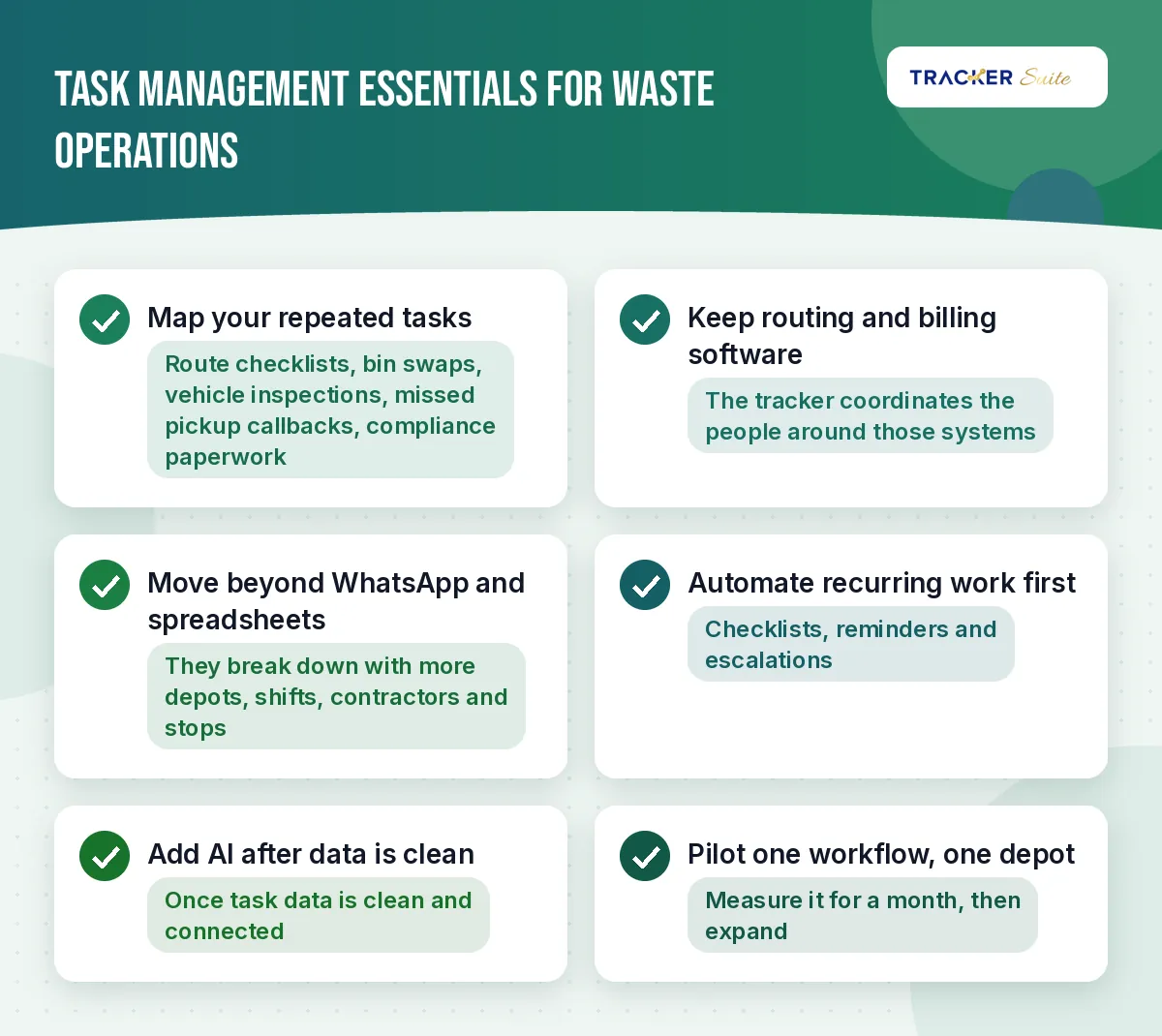 – Waste operations run on hundreds of small, repeated tasks: route checklists, bin swaps, vehicle inspections, missed pickup callbacks and compliance paperwork.
- A task tracker does not replace route optimisation or billing software. It coordinates the people who do the work around those systems.
- WhatsApp groups and spreadsheets work for one depot and a few trucks. They break down once you add depots, shifts, contractors and thousands of weekly stops.
- Automate recurring checklists, reminders and escalations first. AI becomes useful once that task data is clean and connected.
- Start with one workflow at one depot, measure it for a month, then expand.
At a glance
-
Who this is for: Waste collection and haulage firms, municipal contractors, transfer station operators and recycling facilities.
-
Core problem: Supervisors spend their day asking for updates instead of fixing exceptions.
-
What to automate first: Pre-trip vehicle inspections, daily route checklists, missed pickup escalations and maintenance reminders.
-
Cost: See TrackerSuite’s pricing page for current plans.
Why is task coordination so hard for waste management companies?
Waste volumes keep rising, while the work stays spread across trucks, depots, customer sites and shifts. Each stop, bin and vehicle creates a small task that someone has to finish and record. When those records live in calls and chat messages, nobody gets a reliable picture of what was done today.
The volume is large and growing. The UN Environment Programme’s Global Waste Management Outlook projects that municipal solid waste will grow from 2.1 billion tonnes in 2023 to 3.8 billion tonnes by 2050 (UNEP, 2024). For operators, more waste means more routes, more containers and more crews to coordinate.
Here is a country-level example from the United States. The US EPA reports that the United States generated 292.4 million tons of municipal solid waste in 2018, about 4.9 pounds per person per day (US EPA, 2018 data). Every one of those tons passed through a collection, transfer or sorting step that someone planned and checked.
Safety raises the stakes further.
Refuse and recyclable material collectors had a fatal injury rate of 41.4 per 100,000 workers in 2023, the fourth highest of any US occupation (Waste Dive, 2024).
Waste Dive reported that transportation incidents caused 24 of the 35 deaths in solid waste collection that year. A task system can’t make roads safer on its own. What it can do is make sure pre-trip inspections, safety briefings and defect reports happen on time and leave a record.
What does task management software for waste management companies actually do?
This kind of software turns each recurring job into a tracked task with an owner, a deadline and a completion record. Supervisors see open, overdue and finished work across depots in one view. The system sends reminders and escalations automatically, so staff don’t have to remember every callback or inspection themselves.
It helps to be clear about what the software is not. Route optimisation tools plan the sequence of stops. Billing and customer systems hold contracts and invoices. Fleet telematics, meaning the GPS and engine data sent from trucks, shows where vehicles are.
The task layer covers the human work around all of that. It records who completed the pre-trip check, who called back the customer with a missed bin, who repaired the damaged container and who approved the extra bulky waste pickup. If your team already works entirely inside one fleet or route system with strong built-in workflows, you may not need a separate task tool. If work spills into calls, WhatsApp and spreadsheets, a connected task system closes that gap.
Which waste management workflows can you track and automate?
Most waste companies can start with eight workflows. Each one repeats daily or weekly, involves more than one person and creates data that managers need later for customers, auditors or insurers.
- Daily route checklists. Drivers confirm route start, completed stops, skipped stops and reasons. The data shows which streets cause repeat problems.
- Missed pickup escalations. A customer complaint becomes a task with a callback deadline and a re-collection slot. If nobody closes it in time, the depot manager gets alerted.
- Pre-trip vehicle inspections. Brakes, lights, hydraulics and lifting arms are checked before each shift. Defects create a maintenance task instead of a note on paper.
- Preventive maintenance. Service intervals for compactors, hook lifts and skip loaders become recurring tasks, so they don’t depend on someone’s memory.
- Bin and container requests. New bin deliveries, swaps, repairs and removals get assigned, tracked and photographed on completion.
- Crew attendance and shifts. Early collection rounds, night shifts at transfer stations and weekend cover all need clear attendance records.
- Transfer station and MRF tasks. A material recovery facility (MRF) sorts recyclables. Housekeeping, equipment checks and line handovers between shifts can be standard checklists.
- Compliance paperwork. Waste transfer notes, hazardous waste manifests (the forms that track hazardous loads from pickup to disposal), weighbridge tickets and permit renewals each need an owner and a due date.
Why do WhatsApp groups and spreadsheets stop scaling?
WhatsApp and Excel work well for a small operation because everyone knows everyone. The trouble starts when the company adds depots, shifts and contractors. Messages get buried, spreadsheets go out of date and the supervisor becomes the only link between what was planned and what actually happened.
Here is how the scaling journey usually looks:
- Small: One depot, ten trucks, one WhatsApp group. The owner knows every route by heart.
- Growing: Three depots and two shifts. Each depot keeps its own spreadsheet, and handovers between shifts happen by phone.
- Complex: Municipal contracts bring service-level reporting, commercial clients want proof of collection and insurers ask for inspection records.
- Scaled: 200 staff, multiple sites and thousands of weekly stops. Without connected data, managers spend hours compiling reports from chat history.
A few before and after examples make the change concrete:
- Before: A manager calls five drivers to find out why a street was missed.
- After: The skipped stop and its reason are already logged in a shared status view.
- Before: Vehicle defects are written on paper sheets that sit in the cab.
- After: A failed inspection item creates a maintenance task with a photo.
- Before: The monthly contract report takes two days to build by hand.
- After: Completion data feeds a dashboard that is ready when the month closes.
None of this means spreadsheets are wrong. Excel suits simple tracking well. Businesses with multiple teams, locations and recurring workflows eventually need a more connected operational system.
Where does AI help in waste operations, and where should people stay in charge?
AI helps when it works on real task data and the rules you set. It can suggest who should take a task based on past work, flag overdue jobs and check whether a completed task meets its checklist. People still decide on routes, safety and customer commitments.
Practical uses in a waste company include:
- Prioritising exceptions. Highlighting which missed pickups belong to high-value commercial clients or repeat complaint addresses.
- Assisting assignment. Suggesting a crew for a bin repair based on who completed similar jobs nearby.
- Checking completed work. Flagging an inspection marked done with required fields left empty.
- Summarising activity. Drafting a daily depot summary from task data so the manager reviews it instead of writing it.
The human and AI split stays simple. Managers define goals, rules and escalation limits. The platform organises tasks and data. Automation handles reminders and repeat steps. AI assists with priorities and checks where it is configured to, and people stay responsible for safety and service decisions.
What should you look for in an enterprise task management platform?
An enterprise task management platform for waste operations should handle recurring work, mobile field crews, shift attendance and multi-site reporting. It also needs roles and permissions so drivers, supervisors and head office see the right data. Ease of use on a phone matters more than a long feature list.
Use this checklist when you compare options:
- Recurring tasks: Daily, weekly and mileage-based schedules without manual re-entry.
- Mobile first: Drivers and loaders should finish a checklist in under a minute, ideally with photos.
- Location data: Geolocation or geofencing to confirm that work happened at the right site.
- Shifts and attendance: Support for early rounds, night shifts and multiple depots.
- Escalations and approvals: Automatic alerts when tasks go overdue, plus sign-off for extra charges or repairs.
- Reporting: Dashboards by depot, crew and contract, not just by person.
- Permissions and audit trail: A clear record of who did what and when, which supports accountability.
- Integration: A way to connect with your existing tools so task data doesn’t sit in yet another silo.
A simple tool is enough if you run one site with a handful of staff and few repeat jobs. In that case, a shared task list or basic task tracking app will do the job. Move to a broader platform when managers spend more time chasing updates than solving problems.
How does TrackerSuite fit waste management operations?
TrackerSuite is an AI-powered operations platform that connects tasks, attendance, field activity and inventory. For a waste company, its Task Tracker can coordinate route checklists, inspections and escalations. Its attendance and location features address depot and shift visibility. Stack Tracker can manage spare parts and containers across sites.
Here is how the workflows above map to capabilities listed on TrackerSuite’s own pages (checked November 2026):
- Crew coordination and recurring checklists: Task Tracker, with task management, attendance and leave, and real-time reporting modules.
- Field verification: Geolocation tracking and WhatsApp notifications and reminders are listed from the Growth plan upward.
- Multi-depot shifts: The Scale plan lists multi-shift attendance and unlimited geofence sites for attendance.
- Escalations and sign-offs: Workflow and task approval are listed as paid add-ons.
- AI assistance: TrackerSuite describes its AI assistant, Tavi, as suggesting task assignments from past work history and checking completed work against requirements.
- Containers and spare parts: Stack Tracker manages inventory and orders across locations, which suits bins, liners and vehicle parts held at different depots.
- Governance: The Enterprise plan lists advanced security and controls and tiered admin management. Ask the vendor for documented controls before you rely on them for regulated data.
Plan placement and pricing can change, so confirm which features sit in which plan during a demo. TrackerSuite is not a route optimisation or weighbridge system. It works best as the coordination layer alongside those tools.
How do you roll out a task tracker in a waste company?
Start small and measure. Pick one painful workflow at one depot, digitise it, run it for about a month and compare the results with how things worked before. Expand only once crews use the system without reminders from head office.
- Choose one workflow. Missed pickup escalations or pre-trip inspections usually show value fastest.
- Map the current steps. Write down who does what today, including the calls and messages that nobody records.
- Set the rules. Decide due times, escalation limits and who approves exceptions. For example, a missed pickup might need a callback within the same shift.
- Set up sites, shifts and roles. Add depots, crews and permissions so drivers see their own tasks and managers see the whole depot.
- Pilot at one depot. Train supervisors first, then crews. Keep the checklist short.
- Measure. Track overdue tasks, time to close missed pickups and inspection completion rates.
- Expand and add AI. Roll out to more depots, then switch on AI suggestions once you have a few weeks of clean data.
What this means for you
If your supervisors spend the first hour of every shift on the phone, the problem is visibility, not effort. Look at where your daily work is recorded today. If the honest answer is a mix of WhatsApp threads, paper sheets and memory, you are ready for structured task tracking.
You don’t need to digitise everything at once. Pick the workflow that causes the most complaints or the most safety risk, put it into a task tracker and give it a month. The data from that pilot tells you whether to expand.
FAQs
What is the best task management software for waste management companies?
The best option is the one your drivers and loaders will actually use on a phone during a shift. Look for recurring checklists, location confirmation, shift attendance, escalations and depot-level reporting. Test it at one depot before you commit company-wide.
Can a task tracker replace route optimisation software?
No. Route optimisation plans the order of stops, while a task tracker records who did each job, when and with what result. Most growing waste companies use both, with the task system covering inspections, escalations and handovers.
How much does task tracking software cost for a waste company?
Costs vary by vendor and team size. TrackerSuite lists its current plans on its pricing page, and a free trial is available. Confirm current prices and add-ons before you buy.
Do crews need smartphones to use task management software?
In most cases, yes, because checklists, photos and location data come from a mobile device. Some companies give a shared phone or tablet to each truck. Supervisors can also log tasks on behalf of crews during the transition.
When is a simple to-do list enough?
A simple list works for one site, a handful of staff and few recurring tasks. Once you run several depots, multiple shifts or contracts that need proof of service, a connected platform saves more time than it costs to set up.
Conclusion
Waste volumes are rising, safety stakes are high and customers expect proof of service. Task management software for waste management companies helps by turning routes, inspections, bin requests and escalations into tracked work with clear owners. Start with one workflow, connect the data and add automation and AI where they remove real admin work.
If you want to test this with your own depots, see the TrackerSuite plans and free Starter tier and run a one-depot pilot.
Leave a Reply