Are tasks, follow-ups, and daily work getting harder to keep track of as your team grows?
When work is spread across WhatsApp messages, spreadsheets, emails, calls, and different tools, it becomes difficult to know what is pending, who is responsible, and what needs attention next. This is especially challenging for businesses managing multiple employees, teams, locations, field staff, or recurring work.
A task management software platform can bring this work into one place, helping teams assign tasks, track progress, manage deadlines, follow up on pending work, and give managers better visibility into daily operations.
But task management is only one part of the picture. Depending on how your business operates, you may also need workflow management software to manage approvals and recurring processes, or project management software to coordinate larger initiatives.
Understanding Tasks, Workflows, and Projects
What’s the difference between managing a task, running a workflow, and managing a project?
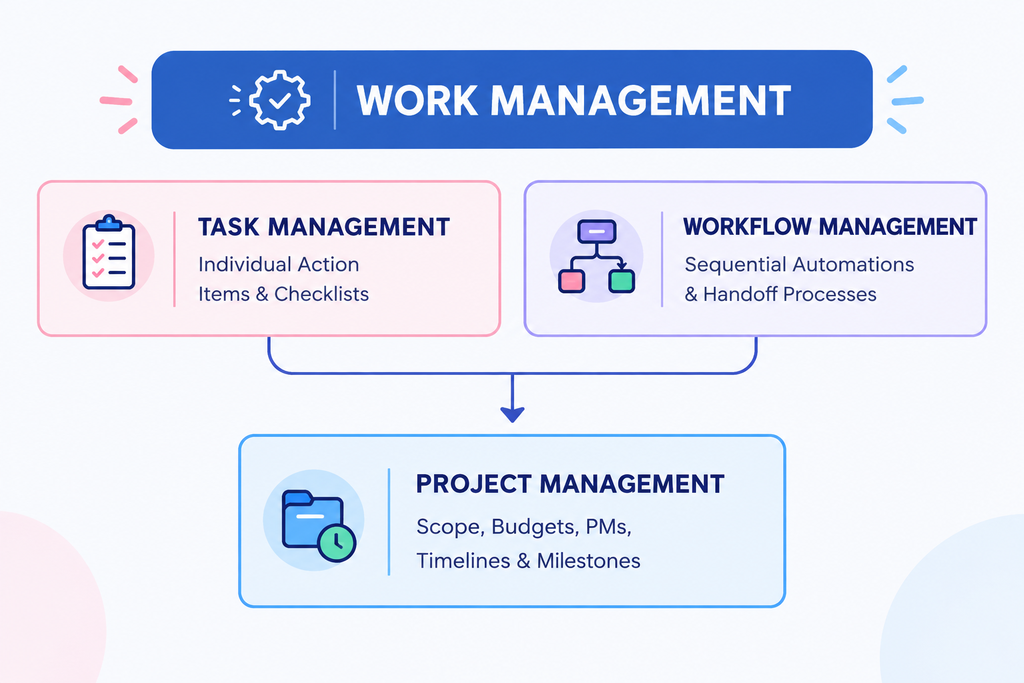
The three may sound similar, but they serve different purposes. A task is a specific piece of work that needs to be completed. A workflow is a series of connected steps that teams follow regularly. A project brings multiple tasks together to achieve a specific goal.
Understanding the difference helps you identify what your business actually needs—whether that is better task tracking, smoother workflows, or stronger project coordination.
1. Task Management: Precision at the Action Level
A task is a specific piece of work assigned to a person or team, usually with a deadline and clear expected outcome. A good task management tool helps employees know what needs to be done, when it is due, and what information they need to complete it.
For managers, it also provides visibility into assigned, ongoing, and pending work—making it easier to follow up, identify delays, and keep daily operations moving.
2. Workflow Management: Connecting Steps and Teams
A workflow is a series of connected steps that teams follow to complete a recurring business process. Workflow management software helps businesses organize these steps, assign responsibilities, manage approvals, and keep work moving from one stage to the next.
For example, a process such as client onboarding, purchase approval, invoice verification, or service requests may involve multiple people or departments. A workflow system helps keep everyone clear about what needs to happen next and who is responsible for it.
3. Project Management: Strategic Milestones
A project is a time-bound initiative with defined objectives, resource limits, dependencies, and deliverables. Effective project in software project management coordinates interconnected tasks across multiple contributors to deliver complex outcomes on time and within budget.
Broadly, an integrated work management software platform combines these three capabilities into a single environment, giving individual contributors clarity and executives high-level operational visibility.
What to Look for in a Task Management System
What should you look for in a task management system beyond a simple to-do list?
For growing businesses, the right team task management software should do more than list tasks. It should help employees stay clear on their responsibilities while giving managers visibility into deadlines, progress, pending work, and follow-ups.
Here are the core capabilities to consider when evaluating a task management system.
Dynamic Prioritization and Categorization
Teams often have different types of work to manage every day. A good task management software should make it easy to organize tasks by priority, category, status, deadline, or team. Different views such as List, Kanban, or Calendar can also help employees and managers see work in the way that suits them best.
Centralized Context and Information
A task should contain the information people need to get the work done. Keeping instructions, files, comments, checklists, and updates connected to the task makes it easier for employees to understand what needs to be done and helps managers track the latest progress without searching across different channels.
Automated Follow-ups and Notifications
Following up on pending work can take up a significant amount of a manager’s time. A good task tracking system can automate reminders and notifications, helping employees stay aware of upcoming deadlines while keeping managers informed when tasks are updated, completed, or need attention.
Cross-Team Collaboration
Many tasks involve more than one team or department. A project task management software platform can give teams a shared place to assign work, share updates, attach files, and track progress.
For example, if a client onboarding process involves sales, operations, and customer support, everyone can see their responsibilities and the current status of the work without relying on separate conversations across different channels.
How Employee Task Management Software Transforms Business Operations
Using employee task management software can help businesses bring more structure and visibility to everyday work. Instead of relying on spreadsheets, chat messages, and manual follow-ups, teams can manage assignments, deadlines, updates, and work history in one place.
| Operational Challenge | Traditional Approach (Spreadsheets/Chat) | Modern Management Software Approach |
|---|---|---|
| Accountability | Ownership can become unclear as tasks move across chats and spreadsheets | Clear task ownership with a record of assignments and updates |
| Deadline Tracking | Teams may rely on manual follow-ups to track approaching deadlines | Deadline reminders and notifications help teams stay aware of upcoming work |
| Workload Balancing | Limited visibility into who has pending or assigned work | A centralized view of assigned and outstanding tasks |
| Status Reporting | Time-consuming manual status meetings and updates | Centralized task status and progress visibility |
| Knowledge Retention | Context and files can be scattered across different channels | Task-related information, files, comments, and updates kept together |
1. Eliminating the Status Meeting Tax
Teams can spend significant time collecting updates and discussing routine task status. With an automated task management system, employees can update task status while managers get a centralized view of progress. Managers can quickly see completed, ongoing, and overdue tasks, making it easier to identify what needs attention and use meeting time for more important discussions.
2. Fair and Transparent Workload Distribution
When managers have limited visibility into team workloads, it can be difficult to distribute work effectively. Modern task management software can provide a centralized view of assigned, ongoing, and outstanding work, helping managers make more informed decisions about task allocation and follow-ups.
3. Fostering a Culture of Autonomy
Limited visibility into ongoing work can lead managers to spend more time checking task status and following up with employees. A task management system provides a clear record of assignments, progress, and deadlines, helping employees stay accountable while giving managers better visibility into the work that needs attention.
Integrating Workflows: From Task Lists to Automated Systems
Basic to-do lists may not be sufficient for complex operational processes. As organizations scale, workflow management software can help connect different stages of work, assign responsibilities, manage approvals, and keep processes moving from one step to the next.
Step 1: Mapping the Value Stream
Before automating a process, map out each step of the recurring workflow. Identify who starts the process, what checks are required, who approves the work, and where delays or bottlenecks commonly occur.
Step 2: Setting Trigger-Based Automations
Modern work management software allows teams to create rule-based automations:
- When a task status changes to “Under Review”, then reassign it to the quality lead.
- When a due date passes without a completion stamp, then alert the project coordinator.
- When an invoice asset is uploaded, then notify the finance team immediately.
Step 3: Continuously Removing Bottlenecks
By monitoring how long tasks remain at each workflow stage, managers can identify where work is getting delayed. For example, if tasks regularly remain in an “Awaiting Approval” stage, managers can review the approval process, clarify responsibilities, or adjust workloads to keep work moving.
Connecting Project Management With Everyday Execution
In technology and modern services, project management needs to connect high-level objectives with everyday team execution. When teams work on complex projects, they need visibility into timelines, milestones, dependencies, and individual tasks to keep work moving and identify delays early.
Agile vs. Waterfall in Everyday Task Coordination
While traditional projects often relied on structured Waterfall timelines, many teams now use iterative approaches such as Agile and Kanban. A flexible task management tool can support different ways of organizing and tracking work:
- Agile Sprints: Breaking work into short cycles where teams focus on a defined set of tasks and deliverables.
- Kanban Continuous Flow: Managing work in progress so teams can focus on completing current tasks before taking on new ones.
- Hybrid Planning: Combining high-level project milestones with day-to-day task tracking.
The right project management software should support the way your teams actually work while providing visibility into timelines, tasks, dependencies, and overall progress.
Step-by-Step Implementation Framework for Teams
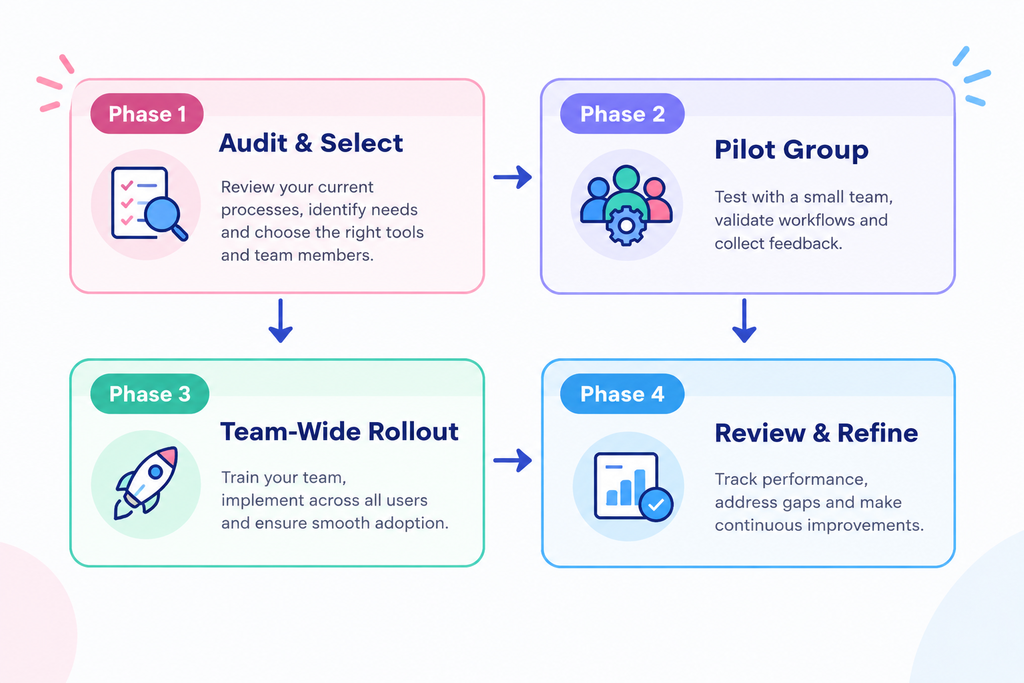
Rolling out a new task tracking software system requires a structured approach to help teams adopt it effectively. Use this four-step roadmap to introduce the system, build adoption, and expand it across the organization.
Phase 1: Audit and Define Communication Standards
Before introducing any software, clarify company expectations:
- What qualifies as a task versus a casual message?
- How should priorities (Urgent, High, Normal, Low) be assigned?
- What is the expected response time for task comments?
Setting clear guidelines helps teams use the platform consistently and keeps important work from getting lost in unstructured communication.
Phase 2: Pilot with a Single Department
Select one team—such as marketing, client services, or product development—to test the platform before expanding it across the organization. Gather feedback on task structures, notifications, and ease of use, then adjust the setup accordingly.
Phase 3: Establish the Platform as the Central Work Record
During company-wide rollout, establish a clear rule that important work, deadlines, and updates should be recorded in the platform. When colleagues ask for updates through private chats or informal conversations, direct them to the corresponding task. This helps build consistent working habits across the organization.
Phase 4: Review Usage and Optimize Processes
After 30 days, review how the system is being used. Are tasks being completed on time? Are certain team members handling more work than others? Use these insights to refine workflows, improve task allocation, and address recurring bottlenecks.
At TrackerSuite.ai, we aim to help businesses improve workplace productivity and collaboration with AI-powered tools designed to organize work, improve visibility, and reduce manual coordination.
Key Metrics to Monitor in Your Task Tracking System
To understand how effectively your task tracking system is supporting daily operations, monitor these key metrics:
- On-Time Completion Rate: The percentage of tasks completed on or before their due date.
- Cycle Time: The time taken from task creation to completion.
- Overdue Task Ratio: The proportion of active tasks that have passed their due date.
- Workload Distribution: The number of open and assigned tasks across team members, helping managers identify uneven workloads.
- Follow-Up Time: How quickly reviewers respond or provide approval when a task is ready for review.
Monitoring these metrics regularly can help managers identify delays, workload issues, and process bottlenecks before they affect ongoing work or deadlines.
Conclusion: Empower Your Team with Purpose-Built Work Management
Spreadsheets, sticky notes, and chat messages may work when a business is small, but they can become difficult to manage as teams, locations, and day-to-day operations grow. The right task management software can bring assignments, deadlines, follow-ups, and progress tracking into one place.
By bringing task tracking, workflow automation, and project visibility into an AI-powered platform, teams can improve clarity around responsibilities, deadlines, and ongoing work while reducing manual coordination.
Ready to improve the way your team manages everyday work? Explore TrackerSuite.ai to see how the platform can fit your organization’s needs.
Leave a Reply