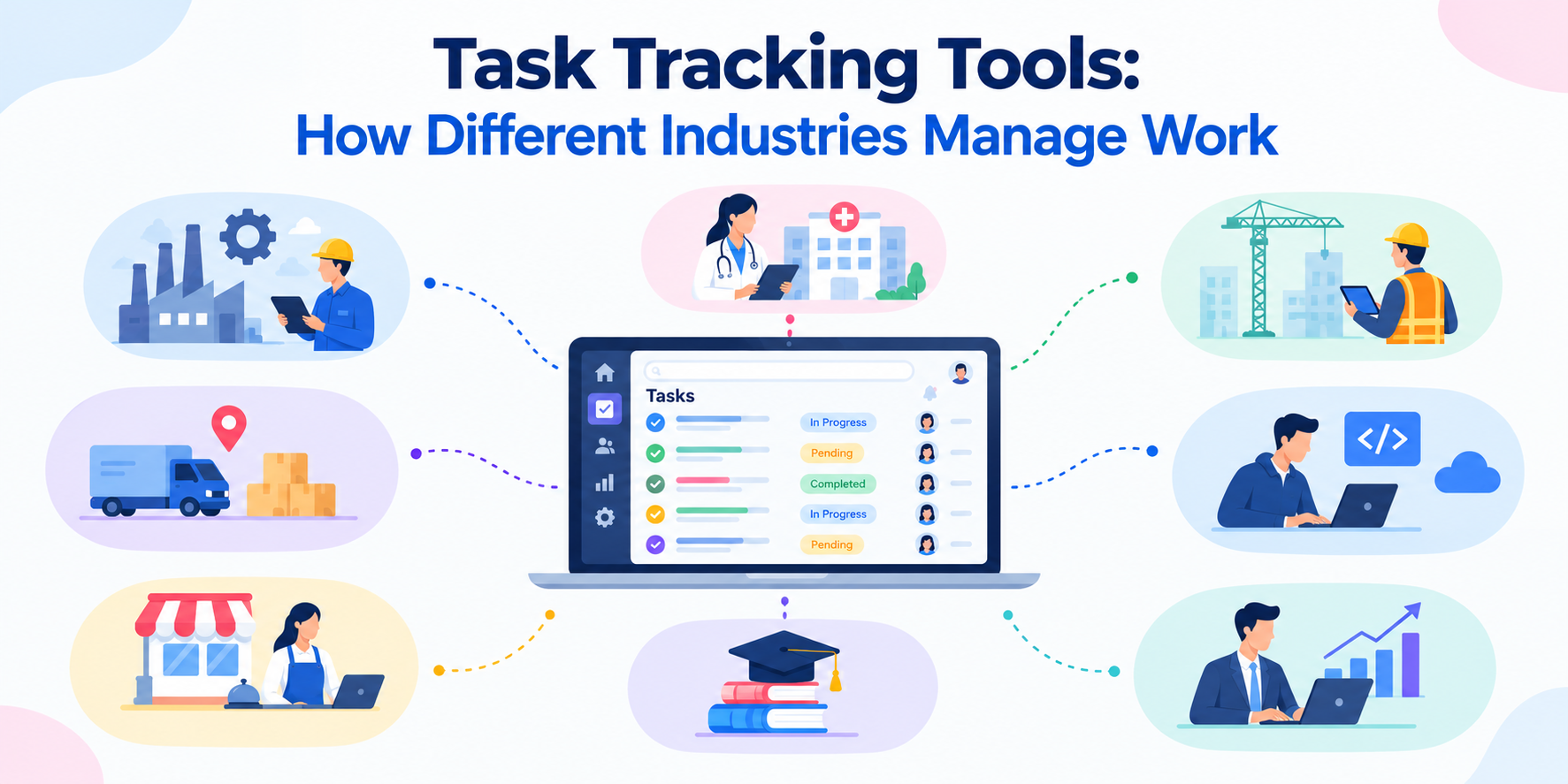
Managing daily work becomes difficult when tasks are spread across spreadsheets, emails, chat messages, and different software tools. Teams can lose track of deadlines, miss follow-ups, and spend too much time asking for status updates. Task tracking tools help solve this problem by giving teams one place to create, assign, organize, and track work.
But task tracking does not look the same in every industry. Software teams may need sprint planning and bug tracking, while construction teams may need field updates and inspection records. Ecommerce teams may focus on product launches and campaigns, while data teams may need structured request management. Let us see how task tracking tools work, where they are used, what features different teams need, and how to choose the right platform.
What Are Task Tracking Tools?
Task tracking tools are software platforms that help businesses manage work from start to finish. Teams can use them to:
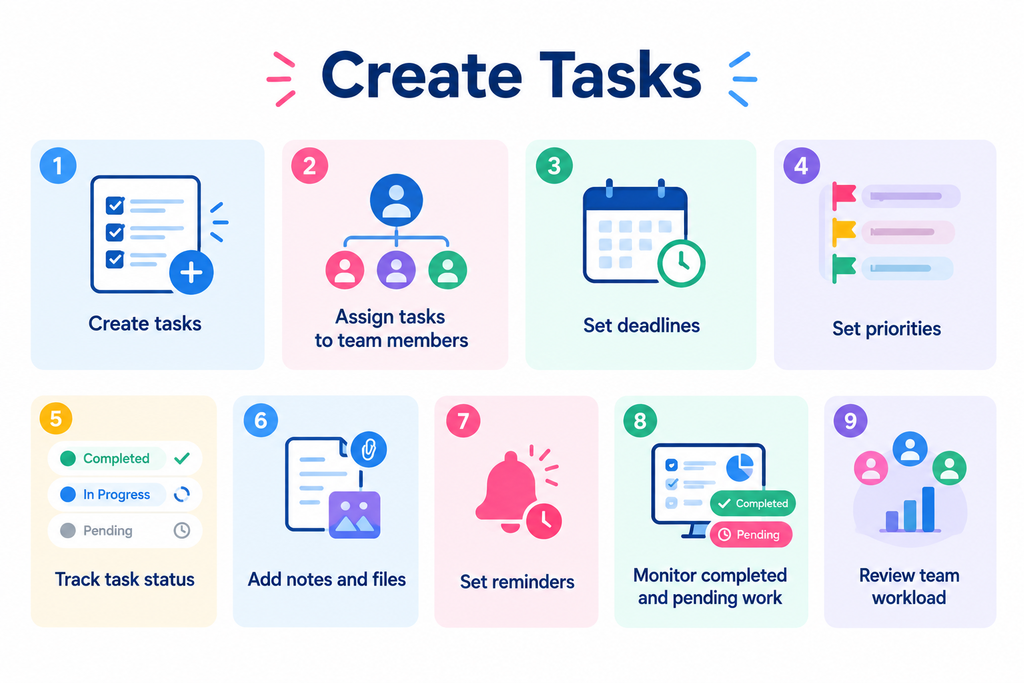
Instead of relying on memory or scattered messages, teams can use a central system to see what needs to be done and who is responsible for it.
Why Do Businesses Use Task Tracking Tools?
As businesses grow, managing work manually becomes harder. More employees, customers, projects, and deadlines mean more tasks to track. Task tracking tools can help businesses improve daily work in several ways.
1. Clear Task Ownership
Every task can have a specific owner and deadline. Employees know what they are responsible for, while managers can see who is handling each task.
2. Better Visibility
Managers do not have to depend only on meetings or individual updates. They can check task status and see what is completed, pending, or overdue.
3. Fewer Missed Tasks
Due dates, reminders, and notifications help teams keep track of important work and follow-ups.
4. Less Manual Follow-Up
When task status is updated in one system, managers spend less time asking employees for basic progress updates.
5. More Consistent Work
Businesses can create repeatable task processes for work that happens regularly. This helps teams follow the same steps each time.
Task Tracking Tools for Decision-Making and Management
Managers need accurate information about daily work to make timely decisions. Without a central task tracking system, managers may have to collect updates from different people, spreadsheets, emails, and chat groups. Task tracking software can bring this information together. Managers can use task data to understand:
- Which tasks are completed
- Which tasks are overdue
- Where work is getting delayed
- Which employees are handling more work
- Which projects need attention
- How work is progressing against deadlines
This gives managers a clearer view of day-to-day operations and helps them act before small delays become larger problems.
Task Tracking Tools for Engineers and Software Teams
Software engineering teams manage several types of work at the same time, including product development, bug fixes, testing, code reviews, and releases.
Task tracking tools for engineers help teams organize this work and track progress across different stages.
Common engineering workflows include:
- Backlog management
- Sprint planning
- Bug tracking
- Feature development
- Code review
- Testing
- Product releases
Important Features for Engineering Teams
Engineering teams may need features such as:
Task dependencies: Teams can see which tasks need to be completed before another task can begin.
Sprint tracking: Teams can organize work into sprints and monitor progress.
Task priorities: Developers can focus on high-priority bugs, features, or fixes.
Status tracking: Teams can move work through stages such as To Do, In Progress, Review, Testing, and Completed.
The right task tracking system can help engineering teams keep development work organized without relying on long email threads or separate spreadsheets.
Task Tracking Tools for Data Analysts
Data analysts often receive requests from sales, marketing, finance, product, and other teams.
These requests may include reports, dashboards, data analysis, or one-time queries.
Without a structured system, it can become difficult to decide which request should be handled first.
Task tracking tools for data analysts can help teams:
- Collect data requests in one place
- Set priorities
- Assign requests
- Track deadlines
- Monitor pending work
- Keep stakeholders updated
This gives analysts a clearer work queue and helps other teams understand when their requests are being handled.
Task Tracking Tools for Civil Engineers
Civil engineering projects involve multiple stages, teams, approvals, and deadlines.
Task tracking tools for civil engineers can help teams organize work related to:
- Design reviews
- Site inspections
- Project milestones
- Documentation
- Approvals
- Contractor coordination
- Compliance activities
When several teams are working on the same project, task tracking can make handoffs easier to manage.
For example, a task can be assigned to one team for design work and then moved to another team for review or approval.
Task Tracking Tools for Construction
Construction projects involve many moving parts. Project managers need to coordinate contractors, engineers, suppliers, supervisors, and field workers.
A delay in one task can affect several other activities.
Task tracking tools for construction help teams manage work such as:
- Site inspections
- Safety checks
- Punch lists
- Material deliveries
- Contractor tasks
- Project milestones
- Maintenance work
- Approvals
Mobile access is especially useful for construction teams. A site supervisor can update a task from the field, add photos, record progress, and share the update with the relevant team. This reduces the need to wait for manual reports from the site.
Task Tracking Tools for Executive Assistants
Executive assistants often manage many deadlines and follow-ups at the same time. Their work may include:
- Meeting preparation
- Travel arrangements
- Document follow-ups
- Calendar management
- Internal coordination
- Recurring administrative tasks
Task tracking tools for executive assistants can help organize this work and make sure important follow-ups are not missed. Recurring tasks and reminders can also reduce the need to manually remember routine activities.
Task Tracking Tools for Event Planning
Event planning involves several teams and deadlines. A single event may require coordination between venues, speakers, vendors, marketing teams, sponsors, and registration teams.
Task tracking tools for event planning can help teams organize tasks across different stages, including:
- Venue planning
- Speaker coordination
- Vendor management
- Marketing
- Registration
- Catering
- Audio and visual setup
- Event-day activities
Task dependencies can also help teams understand how one delay may affect other activities.
Task Tracking Tools for Education
Educational institutions manage a wide range of academic and administrative activities. These may include:
- Curriculum planning
- Faculty activities
- Student admissions
- Assessments
- Academic events
- Compliance work
- Administrative approvals
Task tracking tools for education can help teams assign responsibilities, track deadlines, and monitor ongoing work. This can be useful for schools, colleges, universities, training organizations, and education companies.
Task Tracking Tools for Ecommerce
Ecommerce businesses manage work across several areas, including products, marketing, sales, inventory, customer support, and operations. A product launch alone may involve many tasks across different teams. Task tracking tools for ecommerce can help teams manage:
- Product launches
- Product content
- Product photography
- Marketing campaigns
- Email campaigns
- Social media activities
- Vendor follow-ups
- Inventory-related tasks
- Customer support activities
Repeatable workflows can also help ecommerce teams follow the same process for every product launch or campaign.
Task Tracking Tools for Entrepreneurs
Entrepreneurs often manage many parts of a business at the same time. They may work on sales, hiring, marketing, product development, customer relationships, and finances in the same week.
Task tracking tools for entrepreneurs can help organize these responsibilities.
Business owners can create tasks, set deadlines, delegate work, and keep track of important follow-ups without keeping everything in their heads.
For small businesses, a simple task tracking system can also make it easier to see what the team is working on each day.
Task Tracking Tools for Enterprises
Large organizations often have hundreds or thousands of employees working across different departments. This creates a need for stronger task visibility and control.
Task tracking tools for enterprises may include features such as:
- Role-based access
- Department-level task management
- Approval workflows
- Activity history
- Reporting dashboards
- User permissions
- Integrations
- Custom workflows
Enterprise task tracking software can help different departments follow common processes while allowing teams to manage their own day-to-day work.
Task Tracking Tools for Creatives and Agencies
Creative teams often work through several review stages before a project is complete.
For example:
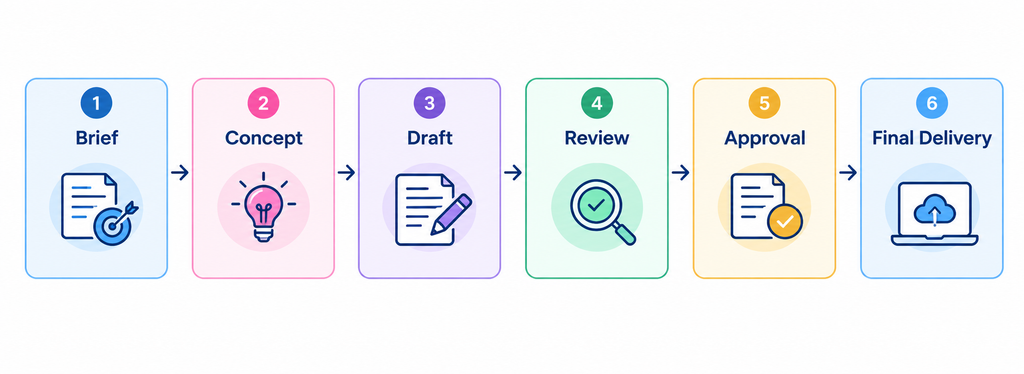
Task tracking tools for creatives can help teams organize these stages and keep feedback connected to the right task.
Design agencies, video teams, content agencies, and creative studios can use task tracking to manage:
- Client projects
- Design work
- Video production
- Content creation
- Client reviews
- Approvals
- Final delivery
This makes it easier for creative teams to understand what is pending and what needs approval.
Task Tracking Tools for Content Creators
Content creation involves more steps than publishing the final piece.
A blog post, video, or podcast may require research, writing, recording, editing, design, publishing, and promotion. Task tracking tools for content creators can help organize this entire process.
A typical workflow may look like:
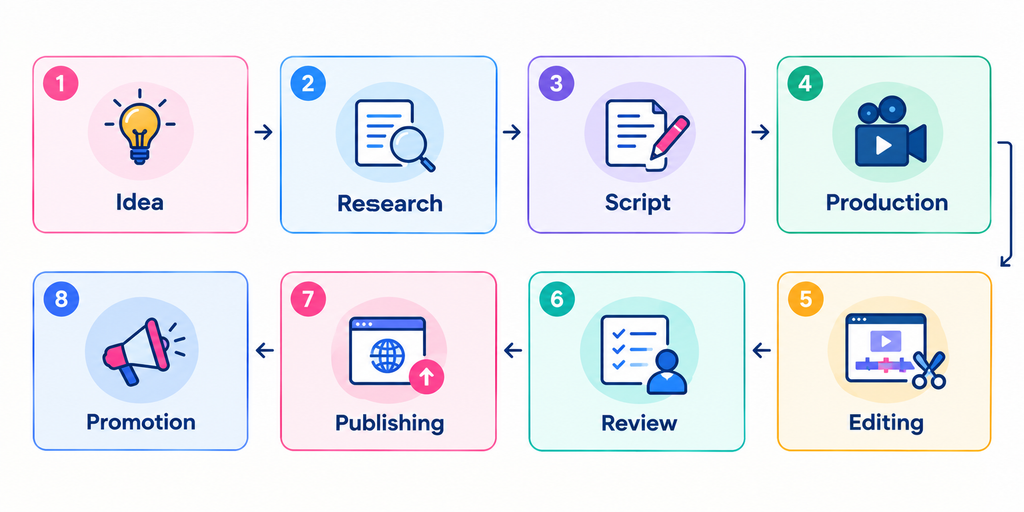
Task templates can help creators repeat this process without forgetting important steps.
Task Tracking Tools for Freelancers
Freelancers often work with several clients at the same time. They need to manage project deadlines while also handling proposals, invoices, meetings, and client communication.
Task tracking tools for freelancers can help them organize:
- Client projects
- Deliverables
- Deadlines
- Meetings
- Follow-ups
- Invoicing reminders
- Personal business tasks
A simple task tracking system can help freelancers keep client work separate and stay on top of deadlines.
Task Tracking Tools by Industry: Comparison
Different teams have different task tracking needs.
| Industry | Common Workflows | Useful Task Tracking Features |
| Software & Engineering | Sprints, bugs, development, testing | Dependencies, priorities, task stages |
| Construction | Site work, inspections, contractors | Mobile access, photos, approvals |
| Ecommerce | Product launches, campaigns, inventory | Templates, deadlines, team coordination |
| Data Analytics | Data requests, reports, dashboards | Request tracking, priorities, queues |
| Executive Support | Meetings, travel, follow-ups | Reminders, recurring tasks, ownership |
| Event Planning | Vendors, speakers, registration | Deadlines, dependencies, task assignments |
| Creative Teams | Design, content, reviews | Visual workflows, files, approvals |
| Enterprises | Cross-team projects, operations | Permissions, reporting, workflows |
The most suitable task tracking tool depends on how your team works, what type of tasks you manage, and how much visibility managers need.
How to Choose the Right Task Tracking Tool
There are many task tracking tools available. Choosing one based only on the number of features can make the decision harder.
Consider these factors instead.
1. Ease of Use
Your team should be able to understand the platform without extensive training.
A complicated system can reduce adoption and push employees back toward spreadsheets and chat messages.
2. Workflow Flexibility
Look for a platform that can match your existing workflow.
Different teams may need different task stages, approval steps, priorities, and responsibilities.
3. Team and Business Size
A tool that works for a small team may not work as well when the business grows.
Check whether the platform can support more users, teams, tasks, and workflows as your business expands.
4. Automation
Look for features that reduce repetitive manual work.
Reminders, recurring tasks, notifications, approvals, and automated workflows can reduce the amount of follow-up managers need to do manually.
5. Reporting and Visibility
Managers need more than a list of tasks.
Look for dashboards and reports that help you understand task progress, overdue work, team workload, and overall performance.
6. Integration With Other Business Tools
Your task tracking software may need to work alongside other systems used by your business.
Integrations can help reduce duplicate data entry and keep information connected across different workflows.
7. Cost
Consider both the software price and the time your team spends managing it.
A low-cost tool may not always be cost-effective if employees still need spreadsheets and manual follow-ups. At the same time, a complex enterprise platform may be unnecessary for a small team. Choose a system that fits your current needs and can grow with your business.
Best Practices for Using Task Tracking Tools
Choosing a task tracking platform is only the first step. Teams also need a clear process for using it.
Keep task descriptions clear
A task should explain what needs to be done and, where necessary, what the expected result is.
Give every task an owner
Avoid tasks that are assigned to an entire department without a clear person responsible for completing them.
Set realistic deadlines
Deadlines should reflect the actual time needed to complete the work.
Use priorities
Not every task needs the same level of urgency. Use priorities to help employees understand what needs attention first.
Review overdue tasks regularly
Overdue tasks should not remain hidden. Managers should review them and understand why they are delayed.
Create templates for repeatable work
If your team performs the same process regularly, create a reusable workflow instead of starting from scratch every time.
Keep the system updated
A task tracking tool only provides useful information when employees keep task status and details up to date.
How TrackerSuite.ai Supports Task Tracking
TrackerSuite.ai is a 3-in-1 AI-powered platform for business operations, workflow automation, and Digital SOP Automation with analytics. Its Task Tracker helps businesses manage tasks, employees, attendance, daily work, approvals, reminders, and workforce activity from one platform.
For teams that work in the field, features such as geo-fenced attendance and proof of work can provide better visibility into on-site activities. TrackerSuite.ai also includes AI-powered task validation, which can help review uploaded images, videos, and documents against task requirements. This can be useful for businesses that want to move beyond basic task lists and get better visibility into how work is completed.
Final Thoughts
Task tracking tools help businesses bring everyday work into one organized system. Whether you manage software development, construction, ecommerce, data analysis, events, creative work, or enterprise operations, the basic goal remains the same: Know what needs to be done, know who is responsible, and know what is happening.
The right task tracking software can reduce manual follow-ups, improve visibility, and help teams stay on top of their daily work. For businesses that still depend heavily on spreadsheets, emails, and chat messages to manage work, moving to a dedicated task tracking system can be a practical step toward more organized operations.
Leave a Reply